Configuring Your Cost Settings
Cost settings are the defaults CrafterBy applies whenever you create a product. Getting them right before you add products saves correcting values later.
Settings → Cost Settings. The page is five cards.
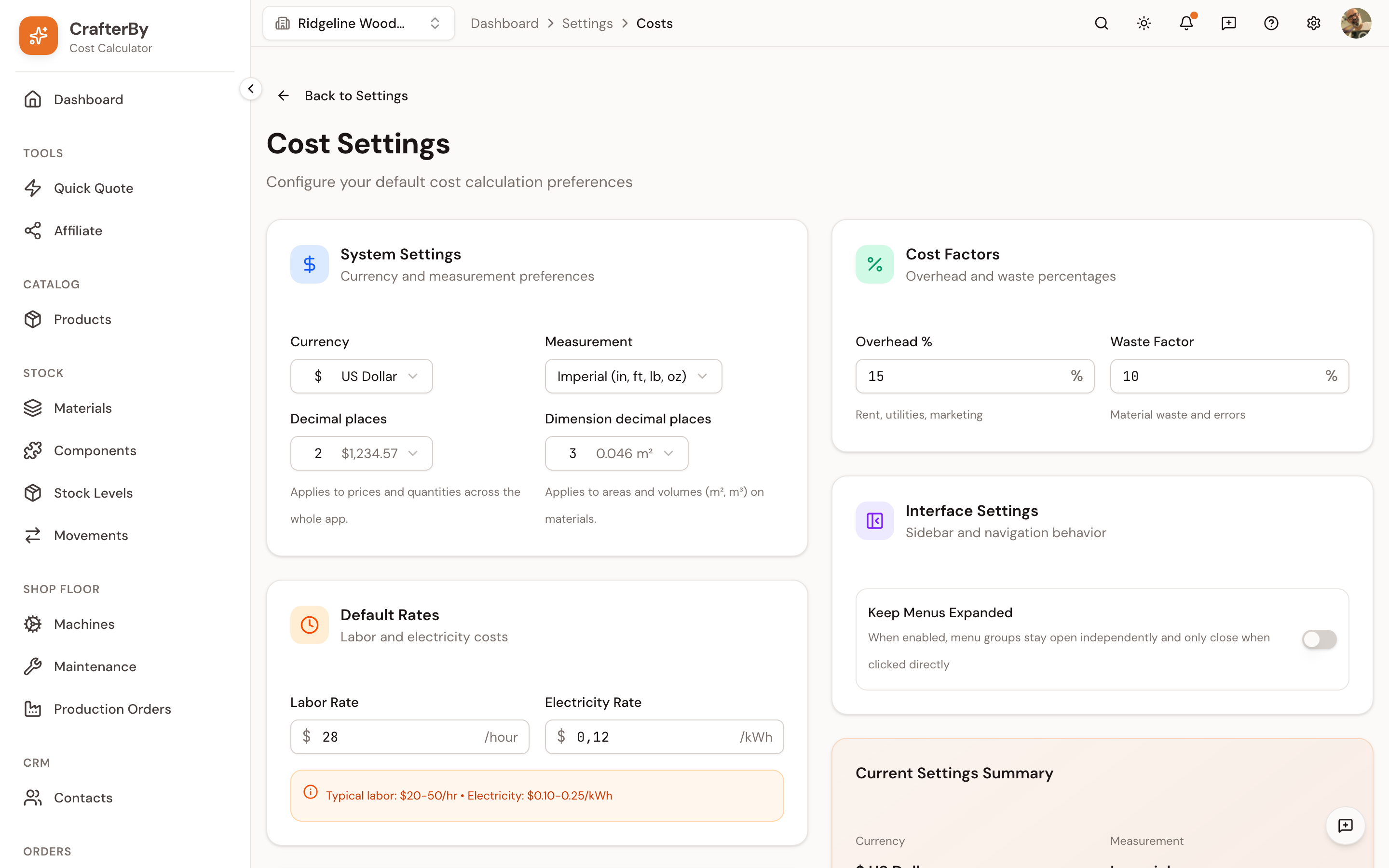
System Settings
| Field | What it does |
|---|---|
| Currency | The currency every price and cost is displayed in. |
| Measurement | Metric (cm, m, kg, L) or Imperial (in, ft, lb, oz). |
| Decimal places | Applies to prices and quantities across the whole app. |
| Dimension decimal places | A separate control for areas and volumes (m², m³) on materials, which need finer precision than money. |
Currency lives here, not on the organization form — that form only asks for a Name and a Slug. And changing currency converts nothing: there is no exchange-rate logic in CrafterBy, so a material entered as 10 stays 10 with a different symbol.
Default Rates
| Field | What it does | Typical |
|---|---|---|
| Labor Rate | Cost of one hour of your time, per hour. Used on every product where you log time. | 20–50 / hr |
| Electricity Rate | What you pay per kWh. Turns a machine's power draw into an hourly cost. | 0.10–0.25 / kWh |
Set the labour rate to what you want to earn, not what you currently earn. Example: a leather-goods maker logs 45 minutes to cut and stitch a card wallet. At an 18.00 hourly rate that step costs 13.50.
Include in Calculations
Two toggles decide whether Packaging (boxes, materials) and Shipping (shipping expenses) are included in cost calculations by default.
Cost Factors
| Field | What it does |
|---|---|
| Overhead % | The default share added to cover rent, utilities and marketing. |
| Waste Factor | A percentage added to material quantities for offcuts, failed batches and spoilage. |
Waste worked example: set 10%, and a product using 100 g of wax is costed as if it used 110 g. Pick a number that matches your process — a jeweller may run 5% because silver offcuts are reclaimed, while a fragrance blender may need 15% because product is lost in equipment and testing.
Both are defaults. You can override the waste factor on an individual material and on an individual product.
Interface Settings
Keep Menus Expanded controls whether sidebar groups stay open as you navigate.
Current Settings Summary
A read-back panel showing currency, measurement, labour rate, electricity and overhead as they will be applied.
Comments
No comments yet. Be the first to comment!
Log in with your CrafterBy account to leave a comment.
Log in to comment